
How to enable Family Protection in MAX Messenger and protect your family from scammers


Despite the WhatsApp block and gradual restrictions on Telegram, phone scammers haven’t disappeared. They continue to defraud Russians via regular phone calls, and many have already migrated to the MAX messenger. To clear their reputation and provide some assistance to users, the app’s creators have developed
a “Family Protection” feature . According to the developers, it can protect elderly and young relatives from scammers and other
criminals on MAX .

Saving relatives from scammers at MAX
What is Family Protection in the MAX messenger?
Despite its catchy name and promises to protect family members from scammers, Family Protection MAX is simply a way to remotely manage user privacy settings. These include:
- safe mode;
- search for a person by number;
- the ability to call a person;
- restrictions on chat invitations;
- content restrictions.
You can set up the same settings without Family Protection, which, by the way, can be extended to anyone in your contact list, not just your relatives.
How to enable Family Protection in MAX
To enable Family Protection MAX , you need to install the latest version of the app and then generate a code on the device of the main person in the family:
- Launch MAX.
- Open the Profile tab.
- Go to the “Privacy” section, then “Family Protection”.
- Click the “Create Protection” button.
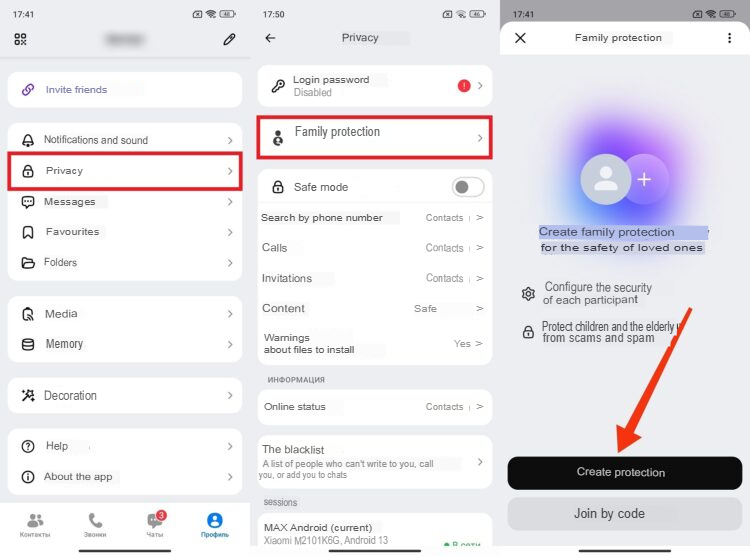
After this, a six-digit code will appear on your smartphone screen. This code must be entered on your relative’s device. Important: they must be in your contacts list. Here’s how to add someone to Family Protection :
- Launch MAX on a relative’s smartphone.
- In the Profile tab, go to the Privacy section, then Family Protection.
- Click the “Enter with code” button.
- Enter the six-digit code and confirm the connection.
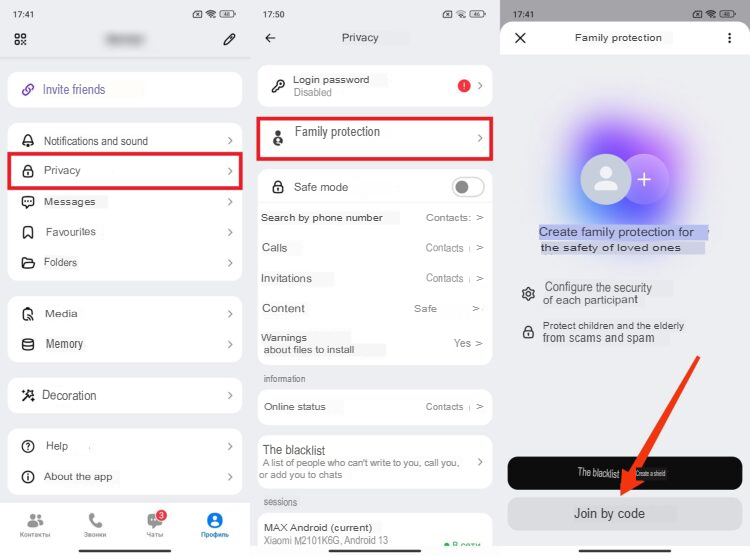
By completing these steps, you’ll effectively block your relative from changing their account’s privacy settings. From now on, you’ll be able to do all of this
in the “Family Protection” section .
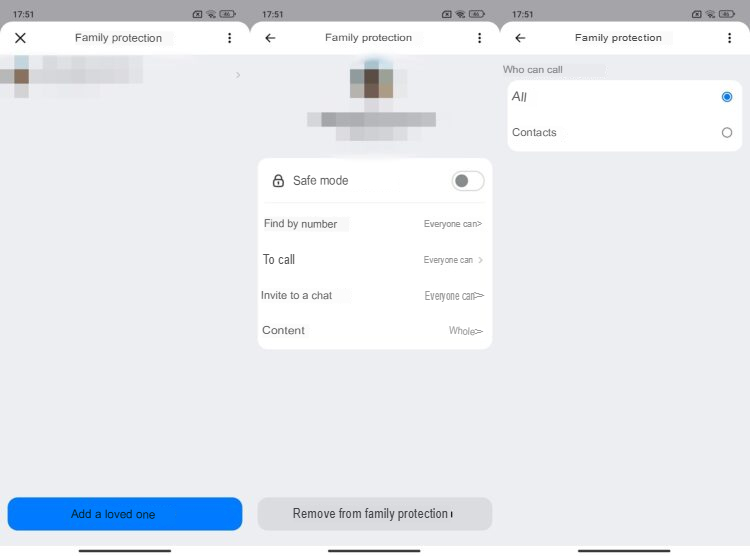
Here you can choose who can call your relative, search for them by number, and invite them to chats. You can remotely restrict their communication with strangers and, if necessary, set content restrictions.







Comments are closed.